
Operating System Interview Questions
Operating System questions show up in almost every technical interview, whether you're applying for a backend, systems, or core CS role - interviewers use them to check how well you understand what's happening underneath the applications you write. This guide walks through 60+ of the most important OS interview questions, with diagrams for the concepts that are easier to see than to describe, organized into Beginner, Intermediate, and Advanced levels.
I. Beginner Level
1. What do you mean by an operating system? What are its basic functions?
An operating system is system software that provides an interface between the user and hardware. It manages system resources like CPU, memory, files, and I/O devices, and provides an environment for running application programs.
For example, when you open a browser, the OS:
- Allocates RAM to the browser
- Gives it CPU time
- Accesses required files
- Manages network and I/O devices
- Provides security and protection
Basic functions of an operating system:
- Process Management: handles the creation, scheduling, and termination of processes running on the CPU.
- Memory Management: tracks primary memory (RAM), allocating space for active programs and freeing it up when no longer needed.
- Security and Protection: guards system data and hardware from unauthorized access using passwords, user permissions, and access controls.
- File Management: organizes, stores, retrieves, and protects data and files on storage drives.
- Device Management: controls peripheral hardware (printers, keyboards, disks) using drivers to ensure smooth communication with the system.
2. What's the main purpose of an OS? What are the different types of OS?
The main task of an operating system is to manage and control the operation of hardware and software resources, providing a convenient, secure environment for program execution.
- Batch OS: executes jobs in batches without direct user interaction during execution - e.g. IBM mainframe batch systems.
- Multiprogramming OS: keeps multiple programs in memory so the CPU can switch between them - e.g. early UNIX systems.
- Multitasking OS: allows multiple tasks/programs to execute concurrently - e.g. Windows, Linux.
- Multi-user OS: allows multiple users to use the system and its resources - e.g. Linux, UNIX.
- Multiprocessing OS: uses two or more CPUs/cores to execute processes - e.g. Linux, Windows.
- Multithreading OS: supports multiple threads within a process - e.g. Windows, Linux.
- Real-Time OS (RTOS): provides responses within specified timing constraints - e.g. VxWorks, FreeRTOS.
- Distributed OS: manages multiple networked computers and makes them work together as a system - e.g. Amoeba.
- Network OS: provides services for managing and communicating between computers over a network - e.g. Windows Server.
- Embedded OS: designed for dedicated devices with limited resources - e.g. Embedded Linux, FreeRTOS.
- Mobile OS: designed specifically for smartphones and tablets - e.g. Android, iOS.
3. What is a kernel? What are the functions of the kernel?
The kernel is the central element of an operating system, acting as an intermediary between user applications and the hardware components of the system. It's the first component loaded into memory after the boot loader during booting, and it resides in memory until the operating system shuts down. Processes request services from the kernel through system calls.
Functions of the kernel:
- Process Management - creates, schedules, and terminates processes
- Memory Management - allocates and deallocates memory space for processes
- Device Management - controls and coordinates peripheral devices
- File System Management - manages file operations and storage
- Interrupt Handling - responds to hardware and software interrupts
- I/O Communication - facilitates input/output operations
- Resource Sharing - ensures fair allocation of system resources among processes
4. What is the difference between Kernel and Operating System?
Operating System:
- System software that manages computer hardware and software resources while providing common services for programs.
- Acts as an intermediary between users and computer hardware, making the system easier to use.
- Key functions include process management, memory management, file system management, device management, and security.
- It's the first program that loads when a computer boots and remains active throughout the system's operation.
Kernel:
- The core component of an operating system that manages system resources and provides low-level services.
- Acts as a bridge between applications and hardware, translating high-level requests into machine-level instructions.
- Operates in kernel mode (privileged mode), giving it direct access to hardware resources.
- Handles critical tasks such as memory allocation, process scheduling, interrupt handling, and device driver management.
5. What's the difference between multiprogramming, multitasking, multiprocessing, and multithreading?
- Multiprogramming: multiple programs sit in memory at once so the CPU always has something to run, but only one program actually executes at any given instant - the goal is keeping the CPU busy, not fast switching.
- Multitasking: builds on multiprogramming by adding time-sharing - the OS switches between programs fast enough that it looks like they're running simultaneously to the user.
- Multiprocessing: the system has more than one physical CPU or core, so more than one process can genuinely execute at the exact same instant.
- Multithreading: multiple threads run within a single process, sharing that process's memory space, enabling concurrency within one program.
6. What is a process? How does the process differ from the program?
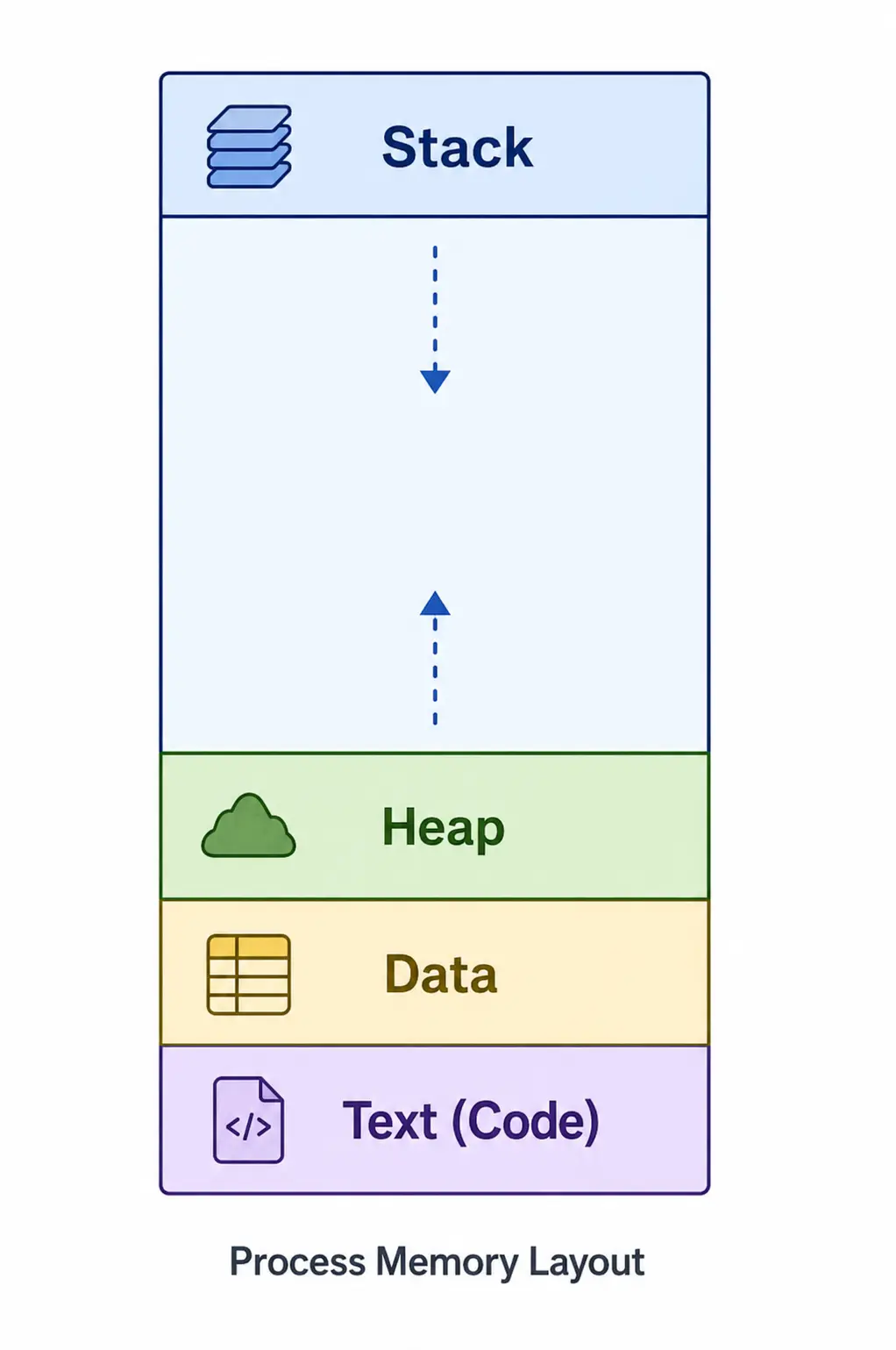
A process is simply a program that is executing - the execution of a process is sequential. When a program is loaded into memory, the computer forms it into a process made up of four segments: stack, heap, data, and text. The image below represents a simple process in main memory.
Program:
A program is an executable file consisting of a set of instructions that complete a specified operation on your computer. For instance, chrome.exe is an executable file that stores an instruction set - allowing a user to explore web pages by opening the browser.
Programs don't exist in a computer's primary memory. Instead, they're stored on secondary memory or disk. A device reads the program into primary memory, and then the kernel executes it.
7. What is the process life cycle?
As a process executes, it passes through different states. These stages may differ across operating systems, and their names aren't fully standardized, but in general a process can be in one of five states at a time.
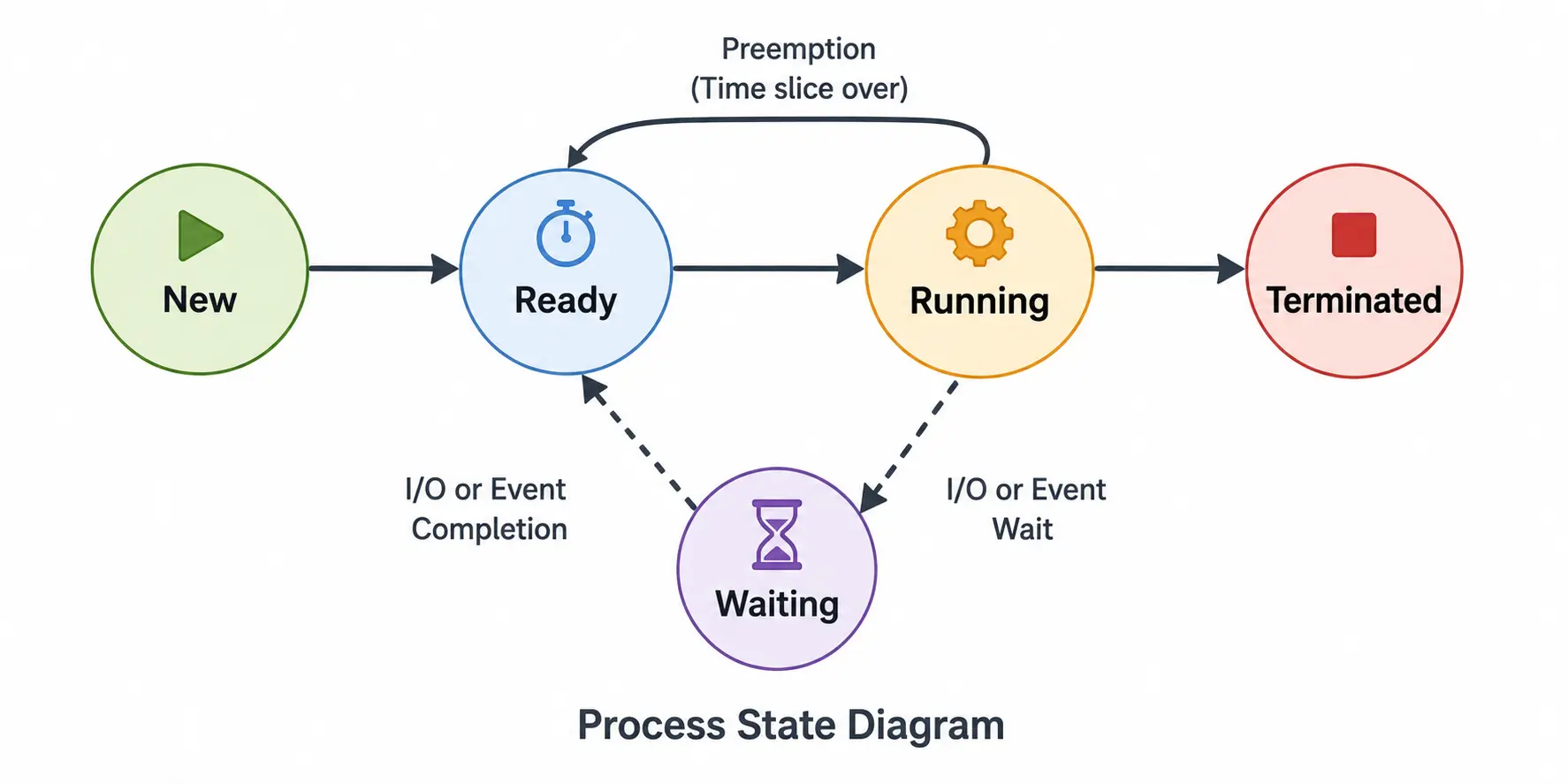
- Start: the initial state when a process is first started/created.
- Ready: the process is waiting to be assigned to a processor. A process can enter this state after Start, or after being interrupted while running so the scheduler can assign the CPU elsewhere.
- Running: once the OS scheduler assigns the process to a processor, its state is set to running and the processor executes its instructions.
- Waiting: the process moves into the waiting state if it needs to wait for a resource, such as user input or a file becoming available.
- Terminated or Exit: once the process finishes execution, or the OS terminates it, it moves to the terminated state, waiting to be removed from main memory.
8. What is a thread?
A thread is a single sequence stream within a process - also called a lightweight process. It's a flow of execution through the process's code, with its own program counter, its own system registers, and its own stack.
A thread shares certain information with its peer threads, like the code segment, data segment, and open files - when one thread alters a data segment memory item, other threads can see and modify that change too.
Each thread belongs to exactly one process, and no thread can exist outside a process.
9. What is an interrupt? What are the different types?
An interrupt is a signal sent to the CPU indicating an event that needs immediate attention. On receiving one, the CPU pauses its current instruction sequence, saves its state, and jumps to a special routine called an Interrupt Service Routine (ISR) that handles the event, before resuming what it was doing.
- Hardware interrupts: raised by physical devices, like a keyboard press, a mouse click, or a disk finishing a read.
- Software interrupts: deliberately triggered by a program instruction - a system call is a common example.
- Exceptions (traps): triggered by an error or unusual condition during execution, like a divide-by-zero or an invalid memory access.
10. What is the booting process of an operating system?
Booting is the sequence of steps a computer follows from power-on to a usable OS:
- Power on - the firmware (BIOS or UEFI) runs a Power-On Self-Test (POST) to check hardware.
- The firmware locates and loads the bootloader from the configured boot device.
- The bootloader loads the operating system kernel into memory and hands off control to it.
- The kernel initializes hardware, drivers, and core services.
- An init process (or systemd, on modern Linux) starts background services and user-space processes.
- The user is presented with a login screen or shell, and the system is ready for use.
11. What is a device driver?
A device driver is a software component that lets the operating system and applications communicate with a specific piece of hardware, without either of them needing to know the hardware's low-level details. It translates generic OS-level calls (like "read this file" or "print this page") into the specific commands that piece of hardware understands.
12. What is spooling?
Spooling (Simultaneous Peripheral Operations On-Line) temporarily holds data in a queue - usually on disk - for a slow device to process at its own pace. Print spooling is the classic example: when you print a document, it's placed in a spool queue immediately, so your application isn't blocked waiting for the printer, and multiple jobs from multiple processes can queue up and print in order.
13. What is buffering? How is it different from spooling?
A buffer is temporary memory used to hold data while it moves between two devices or processes that operate at different speeds - for example, reading a file in chunks into a buffer before processing, so the CPU isn't stalled waiting on slow disk I/O for every single byte.
The distinction from spooling: buffering smooths out a speed mismatch between one producer and one consumer, usually in memory. Spooling manages a queue of jobs for a shared device that multiple independent processes want to use, usually backed by disk.
14. What are the types of Real-Time Operating Systems (RTOS)?
- Hard Real-Time OS: deadlines must be met without exception - missing one counts as a system failure. Used in safety-critical systems like pacemakers or airbag controllers.
- Soft Real-Time OS: deadlines are important, but occasionally missing one is tolerable, usually resulting in degraded quality rather than failure - e.g. video or audio streaming.
15. What is swapping in an operating system?
Swapping moves an entire process out of main memory into secondary storage (swap space), and later back into main memory, to free up RAM for other processes. It's distinct from paging, which moves individual pages rather than an entire process at once - swapping works at the whole-process granularity, paging at the page granularity.
II. Intermediate Level
1. What are the types of kernel?
- Monolithic Kernel: most OS services - process management, memory management, file system, device drivers - run in kernel space. Examples: Linux, traditional UNIX.
- Microkernel: keeps only essential services in kernel space; other services run in user space. Examples: MINIX 3, QNX.
- Hybrid Kernel: combines ideas from monolithic and microkernel designs. Examples: Windows NT, macOS XNU.
- Modular Kernel: has a core design that can dynamically load and unload modules such as device drivers. Example: Linux.
- Exokernel: provides very low-level hardware resource management, giving applications more direct control over hardware. Example: MIT Exokernel.
- Nanokernel: provides an extremely small set of low-level hardware abstractions; higher-level OS services live outside the kernel, mainly in specialized/research systems.
2. What is a Process Control Block (PCB)?
A Process Control Block is an OS data structure that stores all the information about a process - its PID, process state, program counter, CPU registers, scheduling information, memory management details, and I/O state. The PCB is critical to context switching.
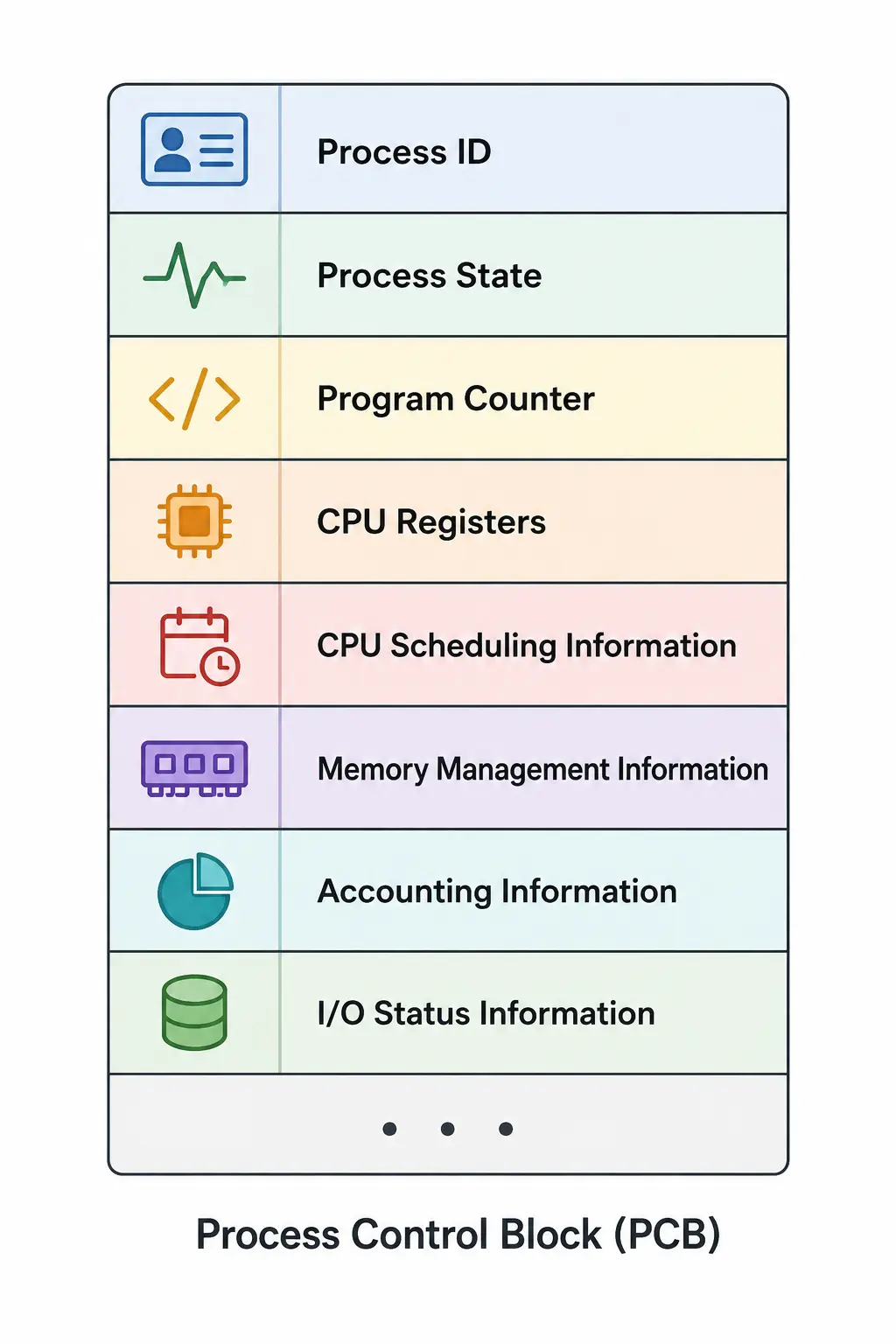
- Process ID (PID) - unique identifier assigned to the process
- Process State - current state: New, Ready, Running, Waiting/Blocked, or Terminated
- Program Counter (PC) - address of the next instruction to be executed
- CPU Registers - stores the current values of CPU registers
- CPU Scheduling Information - priority and other scheduling-related information
- Memory Management Information - information about memory allocated to the process
- Accounting Information - CPU usage, process time, user information, etc.
- I/O Status Information - open files and I/O devices allocated to the process
3. What is a context switch? Why is it required?
Context switching is the technique the OS uses to switch the CPU from executing one process to another.
When a switch happens, the status of the old running process is saved (in its PCB), and the CPU is allocated to the new process. The old process waits in the ready queue while the new one runs.
When the old process resumes, execution continues from exactly where it was halted - this is what lets a multitasking OS share a single CPU across multiple processes without needing additional processors.
4. What is the difference between a process and a thread?
Aspect | Process | Thread |
|---|---|---|
Definition | An active program with independent resources | A lightweight subprocess within a process |
Memory sharing | Has an isolated memory space | Shares code, data, and heap with peer threads |
Context switching | Higher overhead (saves/restores all resources) | Lower overhead (only registers and stack) |
Communication | Via Inter-Process Communication (IPC) mechanisms | Via direct memory sharing, which is faster |
Resource usage | Higher memory and CPU overhead | Lower resource consumption |
Creation time | Slower (separate resources) | Faster (shares existing resources) |
Failure impact | Independent — one crashing doesn't affect others | A crash can affect the entire process |
Synchronization | Not required between separate processes | Required to avoid race conditions |
5. What is the difference between user mode and kernel mode?
In user mode, applications run with limited privileges and can't directly access hardware or other critical systems. When a user program needs a service, it calls a system program through a system call. The mode bit is set to 1 in user mode.
- Limited access to memory and hardware
- Cannot execute privileged instructions
- Applications run in a protected environment
- System calls trigger a transition to kernel mode
The system switches to kernel mode when it runs OS code or responds to system calls. In kernel mode, the CPU can access all data and resources without restriction. The mode bit is set to 0 in kernel mode.
- Direct hardware access and I/O operations
- Memory management and process scheduling
- Interrupt handling and system calls
- Modifying system configuration and security settings
6. What are system calls?
A system call is the interface that connects a user program with the operating system. When a user program needs the OS to do something on its behalf, it goes through a system call - it's the programmatic way a program requests a service from the kernel, such as opening a file, allocating memory, or writing to a socket.
7. What is the difference between an interrupt and a system call?
- Origin: an interrupt is typically raised externally by hardware, or internally by an error condition - it can happen at any point, asynchronously to the running program.
- A system call is triggered deliberately by the running program itself, synchronously, as part of its normal instruction flow, to request a specific OS service.
- Both cause a switch into kernel mode, but an interrupt originates from outside the program's control flow, while a system call is an intentional request the program makes.
8. What is multithreading? What are its advantages?
Multithreading lets multiple threads execute concurrently within a single process. By dividing tasks into smaller, manageable threads, applications can achieve better performance, responsiveness, and resource utilization - though it introduces complexity in synchronization and debugging.
- Improved responsiveness: one thread can keep working while another waits, so the application stays responsive.
- Better CPU utilization: multiple threads can keep the CPU busy instead of leaving it idle during I/O.
- Parallelism: on a multi-core CPU, multiple threads can execute simultaneously on different cores.
- Faster execution: independent tasks can run concurrently, potentially reducing overall execution time.
- Resource sharing: threads of the same process share memory, making communication easier.
- Lower overhead: creating and switching threads costs less than doing so between separate processes.
9. What is process scheduling?
- Process scheduling is the mechanism by which the OS selects a process from the ready queue and allocates the CPU to it, aiming to use the CPU efficiently while minimizing waiting, turnaround, and response time.
- Since multiple processes may be ready to run at once but the CPU can execute only a limited number at a time, the OS uses a CPU scheduling algorithm to decide which process runs next.
There are two types of scheduling:
- Non-preemptive: the resource can't be taken away from a process until it has completed execution.
- Preemptive: the OS allots resources to a process for a specific amount of time, and can switch it out early to prioritize a higher-priority process.
10. What is the difference between logical and physical address?
- Generation: a logical address is generated by the CPU; a physical address is a location in the memory unit itself.
- Computation: logical addresses are generated by the CPU with reference to a specific program; physical addresses are computed using the Memory Management Unit (MMU).
- Visibility: the user can view a program's logical address, but can't view the physical address directly.
1Physical Address = (Frame Number × Page Size) + Offset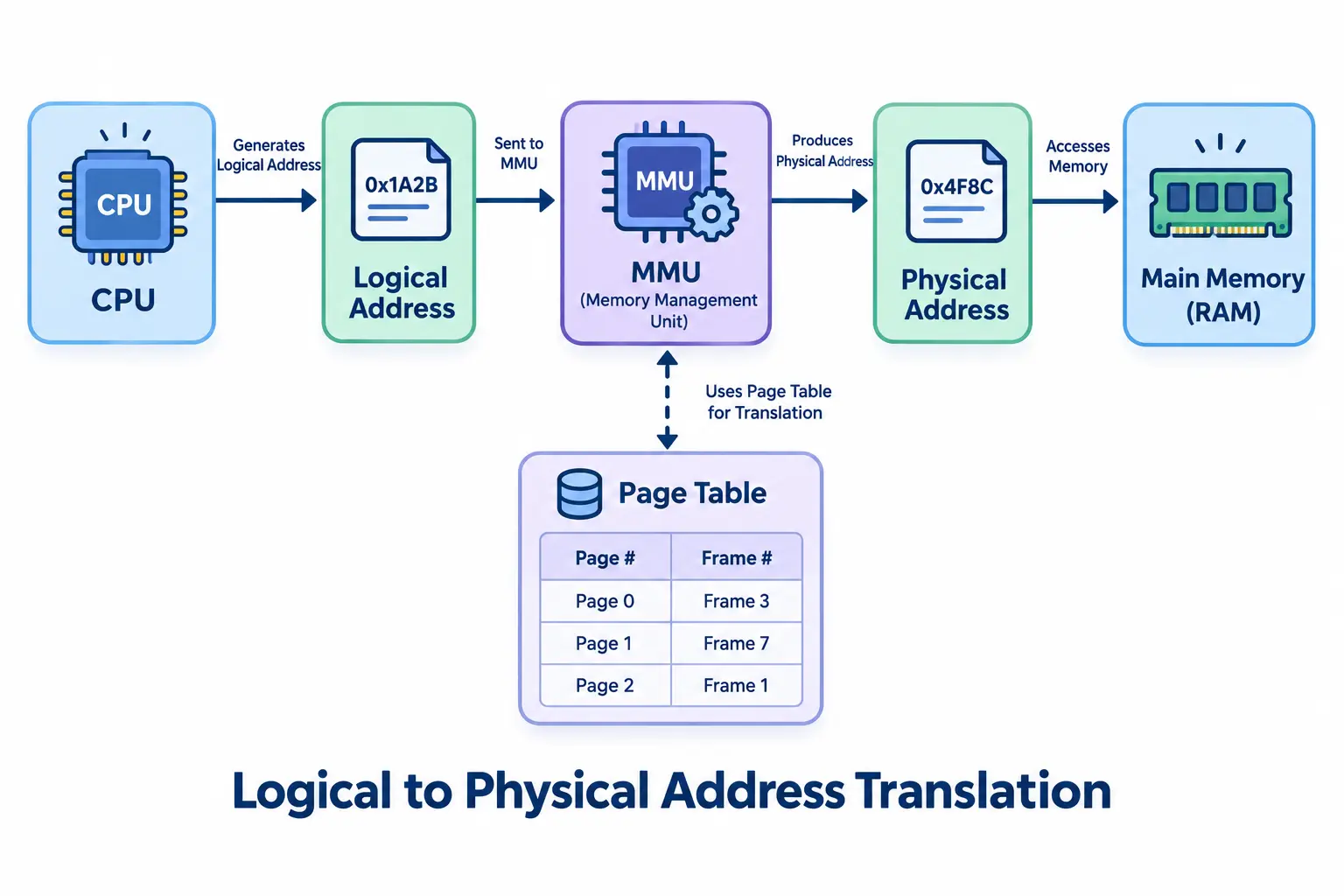
The logical address is a virtual address created by the CPU while a program is running, used as a reference to access the actual physical memory locations via the MMU.
11. What is segmentation?
Segmentation is a memory management technique where each process is divided into several segments of different sizes, one for each logical module (main function, utility functions, data structures, etc.). Segments are loaded into non-contiguous memory, but each individual segment occupies a contiguous block. The OS maintains a segment map table storing the starting address and length of each segment.
- Matches the logical structure of a program
- Different segments can have different sizes
- Segments can be protected separately, and support sharing of logical program components
12. What is paging? Explain page and frame.
Paging is a storage mechanism used to bring processes from secondary storage into main memory as pages. The main idea is to divide each process into individual pages, and correspondingly divide primary memory into frames.
- Page: a fixed-size block of a process's logical (virtual) address space. Pages don't need to sit next to each other in main memory.
- Frame: a fixed-size block of physical memory (RAM). A frame's size always equals a page's size, so any page can fit into any available frame.
13. What is a Translation Lookaside Buffer (TLB)?
A TLB is a small, fast hardware cache inside the CPU that stores recently used virtual-to-physical address translations, so the CPU can avoid a full page-table walk on every memory access. A TLB hit gives near-instant translation; a TLB miss means the CPU has to walk the page table (slower) and then caches that result in the TLB for next time.
14. What is process synchronization? Why is it required?
Process synchronization involves coordinating and controlling concurrent processes to ensure correct, predictable outcomes. Its primary purpose is to prevent race conditions, data inconsistencies, and resource conflicts that can arise when multiple processes access shared resources simultaneously.
- Preventing race conditions: when two or more processes access and modify shared data concurrently, the outcome depends on execution timing - unpredictable timing leads to incorrect results.
- Maintaining data consistency: uncoordinated writes can overwrite important information, corrupting shared data.
- Enforcing mutual exclusion: only one process can enter its critical section at any given time.
- Avoiding deadlocks and starvation: proper coordination prevents processes from getting stuck waiting indefinitely.
15. What is the critical section problem, and what conditions must a solution satisfy?
The critical section is the part of a process's code where it accesses shared resources. The critical section problem is designing a protocol that lets processes cooperate safely when using their critical sections. A correct solution must satisfy three conditions:
- Mutual Exclusion: only one process can execute in its critical section at a time.
- Progress: a process running outside its critical section can't block other processes from entering theirs.
- Bounded Waiting: there's a limit on how many times other processes can enter their critical sections before a waiting process gets its turn.
16. What is the difference between a mutex and a semaphore?
- Mutex: a locking mechanism used purely for mutual exclusion - only the thread that locked it is allowed to unlock it.
- Semaphore: a signaling mechanism built around a counter, which any thread can increment or decrement. Used both for mutual exclusion (as a binary semaphore) and for coordinating access to a pool of multiple identical resources (as a counting semaphore).
17. What is the Producer-Consumer problem?
The Producer-Consumer problem is a classic synchronization scenario: a producer generates data and places it into a shared, fixed-size buffer, while a consumer removes data from that buffer. A correct solution must ensure the producer never adds to a full buffer, the consumer never removes from an empty buffer, and access to the buffer is mutually exclusive. It's typically solved using three semaphores: one counting empty slots, one counting full slots, and a mutex protecting the buffer itself.
18. What is DMA (Direct Memory Access)?
DMA lets peripheral devices - like a disk or network card - transfer data directly to or from main memory without routing every byte through the CPU. A dedicated DMA controller manages the transfer, freeing the CPU to do other work, and interrupts the CPU only once the transfer completes. This dramatically reduces CPU overhead for large data transfers compared to having the CPU copy every byte itself.
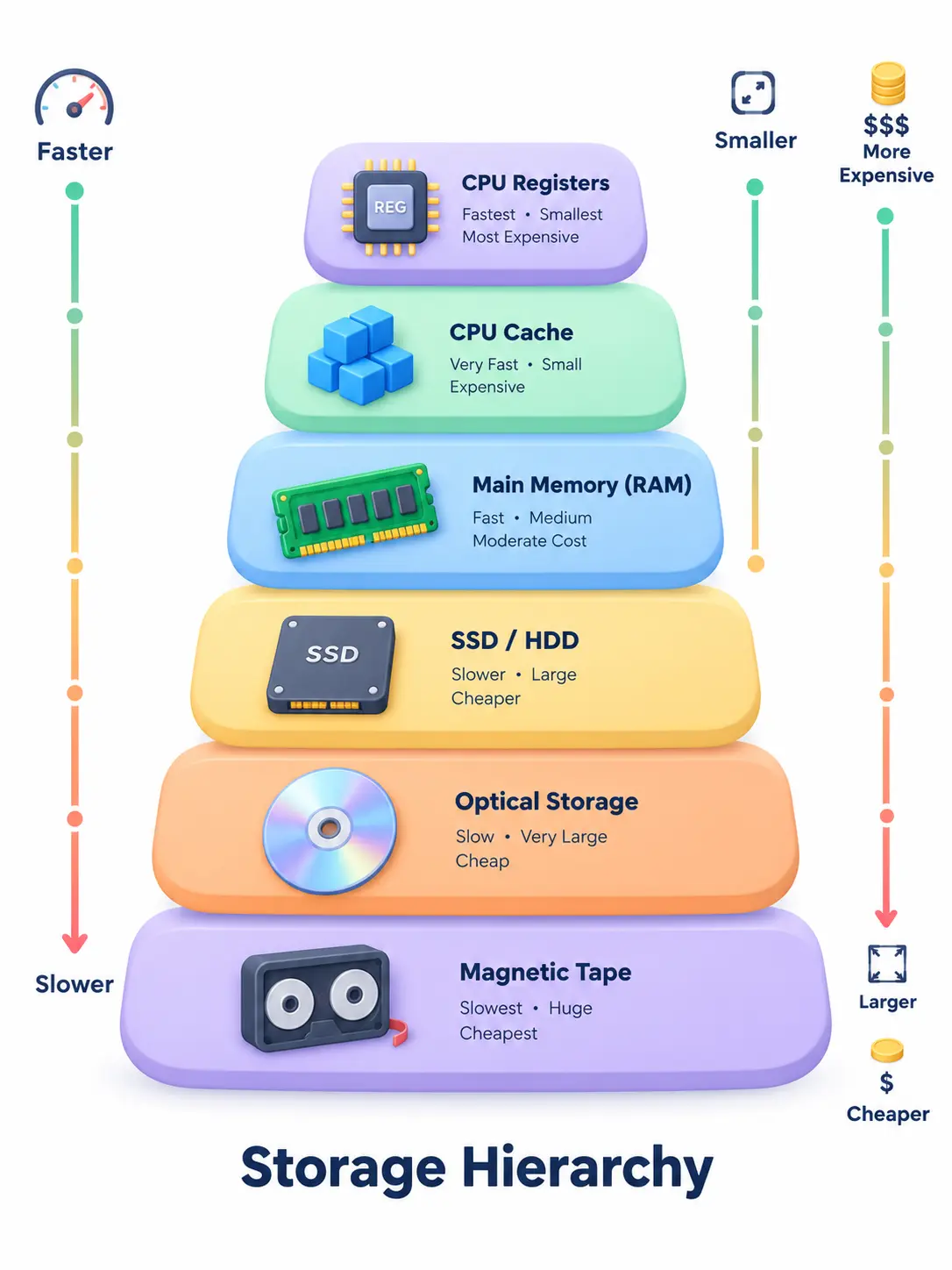
19. What is memory management in an Operating System?
- Memory management is the OS functionality that handles primary memory, moving processes back and forth between main memory and disk during execution.
- It keeps track of every memory location, whether it's allocated to a process or free.
- It checks how much memory should be allocated to processes, and decides which process gets memory and when.
- It tracks whenever memory gets freed or unallocated, and updates its status accordingly.
III. Advanced Level
1. What are FCFS, SJF, SRTF, Priority, and Round Robin scheduling algorithms?
First Come First Serve (FCFS):
- Jobs are executed on a first-come, first-served basis. Non-preemptive, easy to implement via a FIFO queue.
- Performs poorly, since average wait time tends to be high.
Shortest Job Next (SJN / SJF):
- Best approach to minimize average waiting time.
- Easy to implement in batch systems where required CPU time is known in advance; hard to implement in interactive systems, where it isn't.
Shortest Remaining Time (SRT / SRTF):
- The preemptive version of SJF - the CPU goes to the job closest to completion, but it can be preempted by a newer job with an even shorter remaining time.
Priority-Based Scheduling:
- Each process is assigned a priority; the highest-priority process runs first, and equal priorities are handled first-come, first-served.
Round Robin Scheduling:
- A preemptive algorithm where each process gets a fixed time slice (a quantum) to execute before being preempted for the next process in line.
2. What is the convoy effect in CPU scheduling?
The convoy effect is a drawback of FCFS scheduling: if a long CPU-bound process sits at the front of the ready queue, every shorter process behind it must wait for it to finish - even though servicing the short jobs first would minimize average waiting time. It's similar to a slow vehicle holding up an entire lane of highway traffic behind it.
3. What is a scheduler? Explain long-term, short-term, and medium-term schedulers.
The process manager's main activity is process scheduling - releasing the running process from the CPU and choosing another to run based on a particular strategy.
1. Long-Term Scheduler:
- Selects processes from the job pool (secondary memory) and loads them into the ready queue in primary memory, controlling the degree of multiprogramming.
2. Short-Term Scheduler (CPU Scheduler):
- Picks a process from the ready queue and hands it to the CPU for execution - runs far more frequently than the long-term scheduler.
3. Medium-Term Scheduler:
- Handles swapping - temporarily removing processes from main memory (e.g. ones waiting on I/O) to make room for others, and bringing them back later.
4. What are Turnaround Time, Waiting Time, Response Time, and Completion Time?
- Turnaround Time (TAT): total time from a process's arrival to its completion. Formula: Turnaround Time = Completion Time − Arrival Time.
- Waiting Time (WT): total time a process spends waiting in the ready queue. Formula: Waiting Time = Turnaround Time − Burst Time.
- Response Time (RT): time from submission until the process first gets the CPU. Formula: Response Time = Time process first gets CPU − Arrival Time.
- Completion Time (CT): the exact time a process finishes execution and exits the system.
5. What is a deadlock? Explain the four necessary conditions for deadlock.
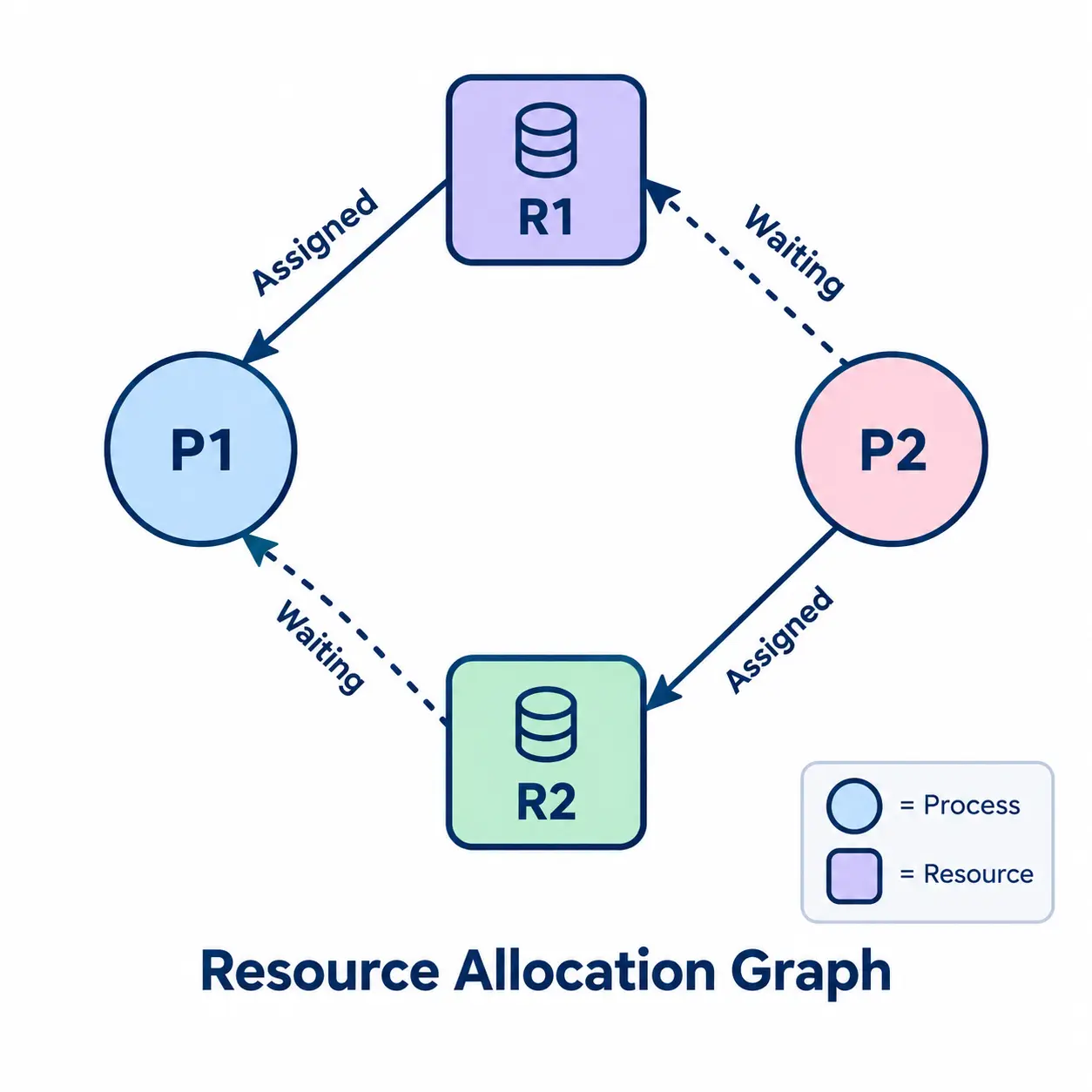
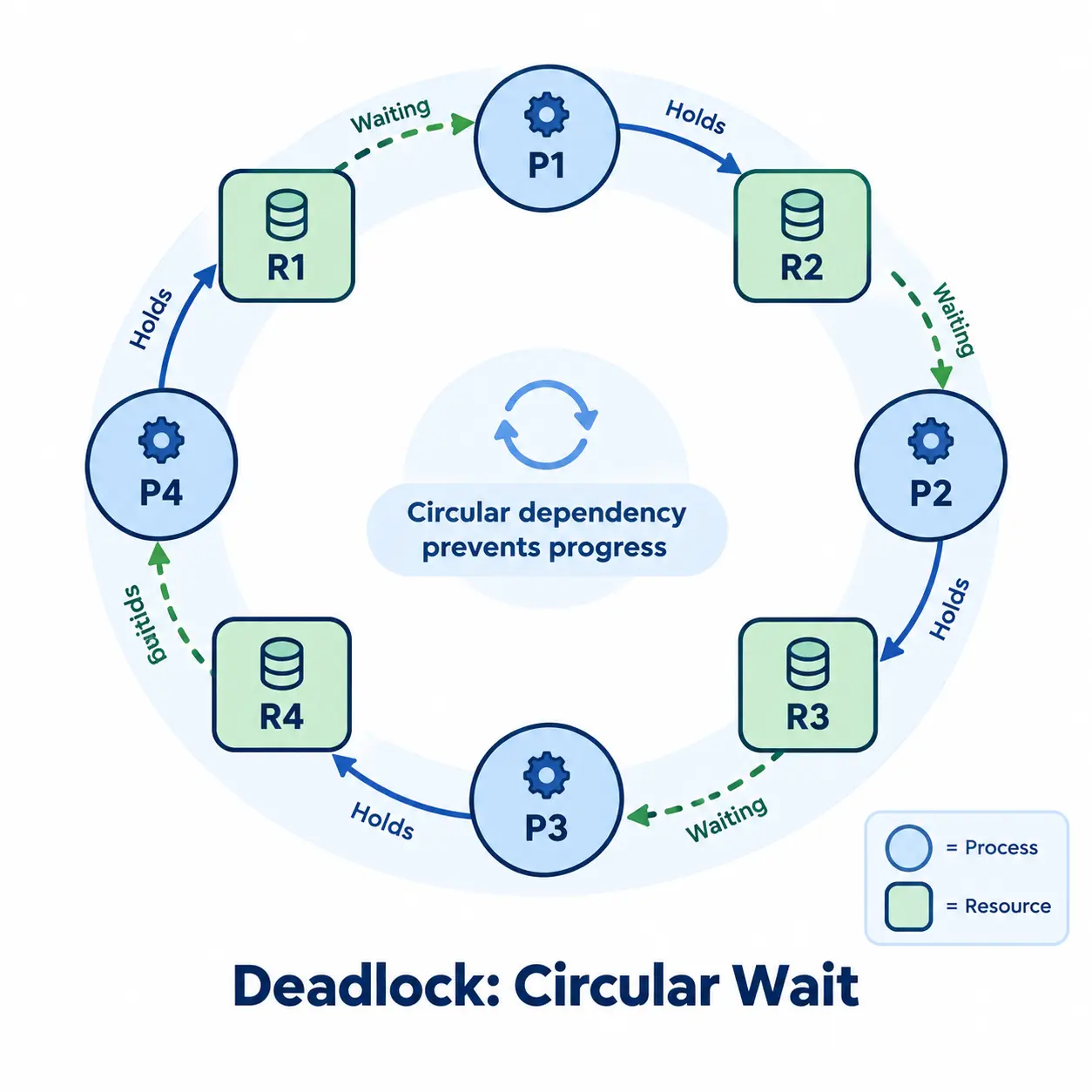
A deadlock is a situation where two or more processes are blocked permanently. It can only occur if four conditions hold simultaneously: mutual exclusion, hold and wait, no preemption, and circular wait. Deadlocks can be handled through prevention, avoidance (e.g. Banker's algorithm), or detection and recovery.
- Mutual Exclusion: only one process can use a resource at a time.
- Hold and Wait: a process holds at least one resource while waiting to acquire others.
- No Preemption: a resource can't be forcibly taken away - only released voluntarily.
- Circular Wait: a set of processes are waiting on each other in a circular chain.
6. What is the Banker's Algorithm?
The Banker's Algorithm is a deadlock avoidance algorithm. Before granting a resource request, it checks whether granting it would still leave the system in a "safe state" - a state where there exists some order in which every process can eventually get all the resources it needs and finish. If granting the request could lead to an unsafe state, the request is delayed. It requires knowing each process's maximum possible resource need up front, much like a banker deciding whether to extend a loan without risking the bank's ability to satisfy all its customers.
7. What is the difference between deadlock and starvation?
- Definition: in a deadlock, multiple processes wait for each other in a circular chain, causing all of them to block permanently. In starvation, a process waits indefinitely while other higher-priority processes continuously use the resource it needs.
- Process state: in a deadlock, all involved processes are blocked and make no progress. In starvation, high-priority processes keep executing while low-priority ones starve.
- Prevention: deadlock is addressed by avoiding one of its four necessary conditions, or via detection and recovery. Starvation is addressed using an aging technique that gradually increases the priority of waiting processes.
- Severity: deadlock is a complete halt for the involved processes. Starvation is less severe - the system continues, but some processes may never execute.
8. What is the difference between livelock and deadlock?
In a deadlock, processes are blocked and completely idle, waiting on each other forever. In a livelock, processes are not blocked - they keep actively changing state in response to one another, but never actually make progress. A common analogy: two people in a hallway repeatedly stepping aside in the same direction to let each other pass, and ending up blocking each other indefinitely, despite constantly moving.
9. What is the Dining Philosophers problem?
The Dining Philosophers problem is a classic illustration of deadlock and resource-sharing challenges: five philosophers sit around a table, and each needs both forks next to them (shared with their neighbors) to eat. If every philosopher picks up their left fork at the same time, none of them can get a right fork - a deadlock. Common solutions include limiting how many philosophers can attempt to pick up forks at once, imposing a strict resource ordering (always pick up the lower-numbered fork first), or introducing a waiter/arbitrator that grants permission to eat.
10. What is the Readers-Writers problem?
The Readers-Writers problem models a shared resource, like a database or a data structure, that multiple readers can access concurrently since reading doesn't change the data, but a writer needs exclusive access since writing does. A correct solution has to balance reader concurrency against the risk of starving writers (if readers never stop arriving) or starving readers (if writers are always prioritized) - common variants include reader-priority, writer-priority, and fair solutions, typically implemented with semaphores and a shared reader count.
11. What is a page fault?
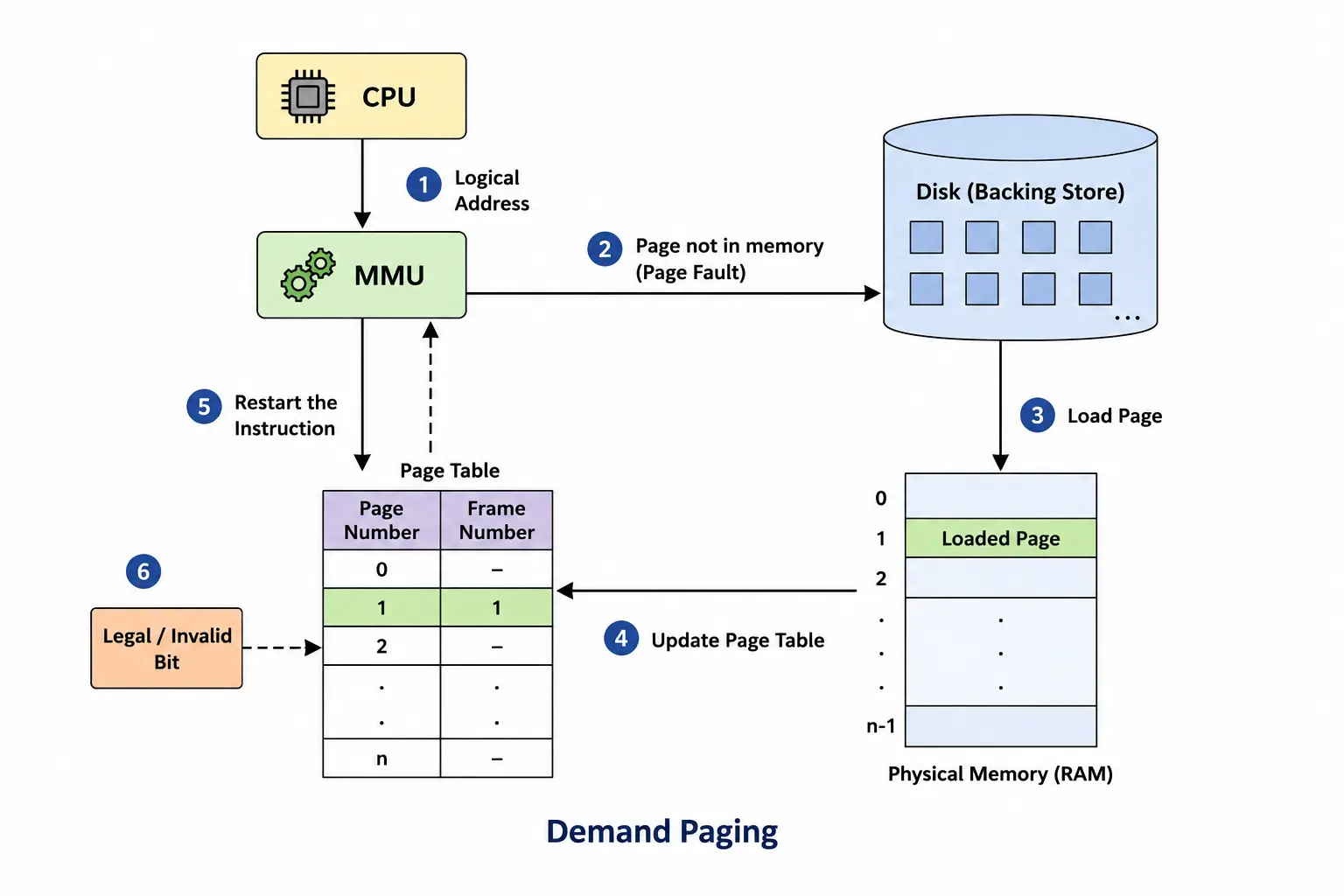
- A page fault is a type of interrupt (a trap) generated by the Memory Management Unit (MMU) when a process tries to access a virtual page that isn't currently loaded into any physical memory frame.
- This mechanism underpins virtual memory, letting data be brought into RAM only when it's actually needed - known as demand paging.
12. What are the common page replacement algorithms (FIFO, LRU, Optimal)?
When a page fault occurs and physical memory is full, a page replacement algorithm decides which page to evict to make room for the new one:
- FIFO (First-In-First-Out): replaces the page that has been in memory the longest, regardless of how often it's used. Simple, but can perform poorly and even suffers from Belady's Anomaly.
- LRU (Least Recently Used): replaces the page that hasn't been accessed for the longest time, on the assumption that recently used pages are likely to be used again soon. Performs well in practice, but is costlier to track precisely.
- Optimal: replaces the page that won't be needed for the longest time in the future. It gives the theoretical best-case fault rate, but requires knowing the future reference pattern, so it's used mainly as a benchmark rather than a practical algorithm.
13. What is Belady's Anomaly?
Belady's Anomaly is the counterintuitive result where, for certain page replacement algorithms (notably FIFO), increasing the number of available page frames can actually increase the number of page faults, instead of decreasing it. It shows that "more memory always means fewer faults" isn't universally true - algorithms like LRU and Optimal don't exhibit this anomaly, because they satisfy a property called the stack property, which guarantees that more frames can never make things worse.
14. What is thrashing? What causes it?
Thrashing is a condition where the system spends most of its time swapping pages in and out of RAM instead of executing actual processes. It happens when there isn't enough physical memory to hold all the active pages of all currently running processes.
- High degree of multiprogramming: too many processes kept in memory at once can trigger thrashing.
- Improper page replacement algorithms: poorly designed algorithms can cause frequent page faults, leading to thrashing.
- Insufficient physical memory: if RAM is too small for the working set of all active processes, thrashing can occur.
15. What are semaphores?
Semaphores are synchronization objects that maintain a count and are used to control or restrict access to resources based on that value. They're flexible enough to handle both binary (0 or 1) and non-binary (greater than 1) resource requirements, helping ensure efficient, safe use of shared resources across concurrent processes.
16. What is fragmentation?
Fragmentation refers to inefficient use of a system's memory space, which reduces overall efficiency. Its practical impact depends on the specific storage allocation scheme and the type of fragmentation involved.
- External Fragmentation: enough total free memory exists, but it's split into small, non-contiguous blocks, making it hard to allocate a large contiguous block.
- Internal Fragmentation: a process is allocated a memory block larger than it actually needs, leaving unused space inside the allocated block.
17. What is the difference between paging and segmentation?
- Individual memory: paging breaks a process's address space into fixed-size blocks called pages; segmentation breaks it into variable-sized blocks called segments.
- Accountability: the OS divides available memory into pages; the compiler mainly calculates individual segment sizes and addresses.
- Speed: paging is comparatively faster at accessing memory; segmentation is comparatively slower.
- Fragmentation: paging may cause internal fragmentation; segmentation may cause external fragmentation.
- Logical address: in paging, it splits into a page number and page offset; in segmentation, into a segment number and segment offset.
18. What is virtual memory? How does virtual memory work?
- Virtual memory is a memory management technique used by many modern operating systems.
- It lets applications use more memory than the computer physically has, by storing the contents of RAM onto a larger space on the hard disk.
- The OS saves the mapping between virtual addresses and physical addresses in a data structure called a page table.
How virtual memory works (in paging systems):
- The part of the program currently in use stays in physical memory (RAM); the rest stays on the hard disk.
- When a process needs to access part of the program, the OS checks the page table to see if that page is already in physical memory.
- If present, the CPU accesses it directly. If not, a page fault occurs, and the OS loads the page from disk into physical memory, updating the page table.
- If physical memory is full while loading a new page, the OS uses a page replacement algorithm to decide which page to evict.
19. What is disk scheduling?
- Disk scheduling is the technique an OS uses to decide the order in which pending disk I/O requests should be serviced.
- When multiple processes request data from a hard disk, the OS schedules these requests in an order that aims to reduce disk access time and improve overall performance.
On a traditional HDD, the disk head has to physically move to the required track - this movement is called seek time. Good disk scheduling tries to minimize seek time and head movement, reduce waiting time, and increase throughput.
20. What are the different disk scheduling algorithms (FCFS, SSTF, SCAN, C-SCAN, LOOK)?
- FCFS: services disk requests strictly in arrival order - simple, but can cause a lot of unnecessary head movement.
- SSTF (Shortest Seek Time First): always services the request closest to the current head position - reduces total seek time, but can starve requests that are far from the current position.
- SCAN (elevator algorithm): the head moves in one direction, servicing requests as it goes, until it reaches the end of the disk, then reverses direction.
- C-SCAN (Circular SCAN): like SCAN, but after reaching one end, the head jumps back to the start without servicing requests on the return trip, giving more uniform wait times across the disk.
- LOOK / C-LOOK: variants of SCAN/C-SCAN where the head only travels as far as the last pending request in that direction, rather than all the way to the physical end of the disk.
21. Explain file allocation methods.
File allocation is the method an OS uses to determine how the blocks of a file are stored on secondary storage, aiming for efficient disk space use and fast access.
1. Contiguous Allocation:
Each file occupies a contiguous set of blocks on disk. The directory entry contains the starting block address and the length of the allocated portion.
2. Linked Allocation:
- Each file is a linked list of disk blocks that don't need to be contiguous; the directory entry points to the starting and ending file block.
- Each block contains a pointer to the next block occupied by the file.
3. Indexed Allocation:
- A special index block contains pointers to all the blocks occupied by a file, and each file has its own index block.
22. What is an inode?
An inode (index node) is a data structure that Unix-like file systems (ext4, XFS, UFS, etc.) use to store all the metadata about a file, separate from the file's actual content and separate from its name. Every file and directory on the disk has exactly one inode, identified by a unique inode number that's unique within its file system.
What an inode stores:
- File type (regular file, directory, symlink, device, etc.)
- Permissions (read/write/execute for owner, group, others)
- Owner (user ID) and group ID
- File size in bytes
- Timestamps: last accessed, last modified, last status change
- A link count (how many directory entries point to this inode)
- Pointers to the actual data blocks on disk that hold the file's content
Notably absent from that list: the filename. The name lives entirely in the parent directory, which is really just a table mapping names to inode numbers. That's why you can rename a file instantly, regardless of its size — renaming only rewrites the directory entry, not the file's data or its inode.
1$ ls -i notes.txt
21548293 notes.txt
3
4$ stat notes.txt
5  File: notes.txt
6  Size: 214       Blocks: 8   IO Block: 4096  regular file
7Inode: 1548293   Links: 1
8Access: 2026-09-20 10:14:02
9Modify: 2026-09-19 22:41:17
One practical consequence: a file system has a fixed number of inodes, set when the file system is created. It's possible to run out of inodes — and therefore be unable to create new files — even while disk space is still free, if the disk holds an unusually large number of tiny files. Running df -i shows inode usage separately from disk space usage.
23. What is the difference between a hard link and a soft (symbolic) link?
Both are ways to make a file accessible from more than one path, but they work at different levels — a hard link operates at the inode level, a soft link operates at the filename/path level.
Hard link:
- Another directory entry that points to the exact same inode as the original file — not a copy, and not a reference to the filename, but a second name for the same underlying data.
- Creating one increments the inode's link count; deleting a file with rm just decrements that count and removes one directory entry. The actual data blocks are only freed once the link count hits zero.
- Because both names point to the same inode, both see any change made through either name — there's no concept of an "original" versus a "linked" copy once the hard link exists; they're equals.
- Limitations: can't span across file systems, because inode numbers are only unique within a single file system. Most systems also disallow hard-linking directories, to avoid creating cycles that would break tools like recursive directory walkers.
1$ ln original.txt hardlink.txt
2$ ls -i original.txt hardlink.txt
31548293 original.txt
41548293 hardlink.txt   # same inode number
Soft (symbolic) link:
- A separate, special file with its own inode, whose content is simply the path string to the target file — conceptually closer to a shortcut than a second name.
- Accessing it means the OS reads the stored path and transparently redirects to that location, which is why it can point across file systems and can point to a directory.
- If the target is deleted, moved, or renamed, the symlink still exists but now points at nothing — a dangling or "broken" link, which will error out when accessed.
- Deleting the symlink itself never affects the target file — you're only removing the shortcut, not touching the original data.
1$ ln -s original.txt softlink.txt
2$ ls -li original.txt softlink.txt
31548293 -rw-r--r-- original.txt
41552110 lrwxrwxrwx softlink.txt -> original.txt   # different inode
In short: a hard link is indistinguishable from the original once created, survives the original being deleted (as long as one link remains), but is constrained to the same file system and can't target directories. A soft link is more flexible and visibly distinct, but fragile — it breaks the moment its target moves.
24. What is RAID? Explain common RAID levels.
RAID (Redundant Array of Independent Disks) combines multiple physical disks into a single logical unit that the OS sees as one drive. Depending on the level chosen, RAID trades off three things against each other: raw performance, fault tolerance (surviving a disk failure without losing data), and usable storage capacity. RAID can be implemented in hardware (a dedicated RAID controller card) or in software (managed by the OS, e.g. Linux's mdadm).
RAID 0 — Striping:
- Data is split into blocks and "striped" across all disks, so reads and writes happen in parallel across drives — significantly faster than a single disk.
- Zero redundancy: losing any one disk in the array loses the entire array's data, since every file's blocks are scattered across all disks.
- Usable capacity: 100% of total disk space. Good fit for scratch/temp data or performance-critical workloads where the data is disposable or backed up elsewhere.
RAID 1 — Mirroring:
- Every disk holds an identical, full copy of the data. Write speed is roughly that of a single disk (every disk must be written), but read speed can improve since reads can be spread across mirrors.
- Survives the failure of any single disk in the mirror with zero data loss — just swap in a replacement and rebuild.
- Usable capacity: 50% of total disk space with two disks (n disks give 1/n usable capacity relative to total). Simple and reliable, but capacity-expensive.
RAID 5 — Striping with distributed parity:
- Data is striped across disks like RAID 0, but a parity block — calculated from the other blocks in that stripe — is also written and rotated across all disks, rather than stored on one dedicated disk.
- Tolerates exactly one disk failure: if a disk dies, its data can be reconstructed from the remaining data and parity blocks.
- Usable capacity: (n − 1) disks' worth out of n total — much better than mirroring for the same fault tolerance, at the cost of a parity-calculation overhead on writes, and a potentially slow, risky rebuild window after a disk failure.
RAID 6 — Striping with double distributed parity:
- Like RAID 5, but with two independent parity blocks per stripe, so it survives two simultaneous disk failures instead of one.
- Usable capacity: (n − 2) disks' worth. Common on large arrays, where the odds of a second disk failing during a long rebuild window become meaningfully high.
RAID 10 (1+0) — Mirrored stripes:
- Disks are first mirrored in pairs (RAID 1), and those mirrored pairs are then striped together (RAID 0) — combining both techniques.
- Delivers both strong performance (striping) and strong fault tolerance (mirroring), and rebuilds are fast since a failed disk just needs to be re-mirrored from its pair, not recalculated from parity across the whole array.
- Usable capacity: 50% of total, same as plain mirroring — the trade-off is hardware cost, since it needs at least four disks. Common choice for databases and other write-heavy, latency-sensitive workloads.
25. What does fork() do, and what are zombie and orphan processes?
fork():
fork() is a system call that creates a new process — the child — as a near-exact duplicate of the calling process, the parent. The child gets its own copy of the parent's memory space, open file descriptors, and register state, and both processes then continue executing independently from the exact same point in the code, right after the fork() call returns.
The way code tells the two apart is the return value of fork() itself: it returns 0 in the child, and the child's actual process ID (PID) in the parent (or a negative value in either if the call failed). This is what lets a single piece of code branch into different behavior for parent and child.
1pid_t pid = fork();
2
3if (pid == 0) {
4    // Child process
5    execvp("ls", args);   // often followed by exec() to run a different program
6} else if (pid > 0) {
7    // Parent process
8    wait(NULL);           // wait for the child to finish, and reap it
9} else {
10    // fork() failed
11}
Most operating systems implement this efficiently with copy-on-write: right after fork(), parent and child actually share the same physical memory pages, marked read-only. A real copy of a given page is only made the moment either process tries to write to it — avoiding the cost of copying a large address space that might mostly get thrown away (e.g. right before an exec() call replaces the child's memory entirely with a new program).
Zombie process:
- When a child process finishes execution, it doesn't disappear from the system immediately — its exit status has to be collected by the parent, via wait() or waitpid().
- Until the parent does that, the child's entry lingers in the process table in a "zombie" or defunct state: it holds no memory or resources beyond its PID and exit status, but it still occupies a slot in the table.
- A handful of short-lived zombies is completely normal and harmless. A steady accumulation of zombies usually signals a bug — a parent that spawns children but never calls wait() on them — which can eventually exhaust the system's process table (its PID limit).
Orphan process:
- The reverse situation: a process whose parent terminates (crashes, or exits normally) while the child is still running.
- Rather than being left parentless, the orphan is automatically "re-parented" to the init process (PID 1, or systemd on modern Linux), which adopts every orphan in the system.
- Init periodically calls wait() on its adopted children, so when an orphan eventually finishes, it gets reaped properly instead of turning into a permanent zombie — this is precisely the safety net that keeps zombies from accumulating forever when a parent dies unexpectedly.
26. What is the difference between symmetric and asymmetric multiprocessing?
Both describe how an operating system organizes work across more than one CPU, but they differ in whether every processor plays the same role, or whether one processor is special.
Symmetric Multiprocessing (SMP):
- Every CPU is treated as an equal, interchangeable peer — any CPU can run any process, including the OS kernel itself, and all CPUs share one common view of main memory.
- The scheduler can freely move a process (or thread) from one core to another, load-balancing work across whichever cores are free, which is what makes SMP scale well as core counts grow.
- Because multiple CPUs can execute kernel code at the same time, the kernel itself has to be written to handle concurrent access safely, using locks and other synchronization primitives to protect shared kernel data structures.
- This is the design used by essentially every modern multi-core desktop, laptop, and server CPU running Windows, Linux, or macOS today.
Asymmetric Multiprocessing (AMP):
- One CPU is designated the master: it alone runs the operating system, makes scheduling decisions, and manages I/O; the remaining CPUs are slaves that execute only application-level work assigned to them by the master.
- Simpler to implement, since only the master CPU needs OS-aware, concurrency-safe kernel code — the slave CPUs just run whatever task they're handed.
- Less flexible and harder to scale: the master CPU can become a bottleneck, and if it fails, the whole system typically goes down with it.
- More common historically, and still seen today in some embedded and real-time systems, where a dedicated CPU or core handles a specific fixed task (e.g. a DSP core handling signal processing while a general-purpose core runs the main OS).
27. What is the difference between virtualization and containerization?
Both let you run multiple isolated workloads on one physical machine, but they draw the isolation boundary at a different layer of the stack — virtualization isolates at the hardware layer, containerization isolates at the OS process layer.
Virtualization:
- A hypervisor sits between the physical hardware and one or more guest virtual machines, presenting each guest with its own virtualized hardware (virtual CPU, virtual disk, virtual NIC).
- Type 1 ("bare-metal") hypervisors, like VMware ESXi or Xen, run directly on the hardware. Type 2 hypervisors, like VirtualBox or VMware Workstation, run as an application on top of a host OS.
- Each guest VM boots and runs a complete, independent operating system with its own kernel — so a single physical machine can run Linux and Windows guests side by side.
- This gives very strong isolation, since a guest VM has no direct access to the host's kernel at all, but it's heavy: each VM duplicates an entire OS, typically taking gigabytes of disk and tens of seconds (or more) to boot.
Containerization:
- A container packages an application together with its libraries and dependencies, and runs it as an isolated process (or group of processes) that shares the host machine's single OS kernel — there's no separate guest kernel involved.
- Isolation is achieved with kernel features rather than virtualized hardware: Linux namespaces give each container its own view of processes, network interfaces, and mounted file systems, while cgroups (control groups) limit and account for the CPU, memory, and I/O each container can use.
- Because there's no second kernel to boot, containers start in a fraction of a second and their images are typically megabytes rather than gigabytes — Docker is the most common tooling for building and running them.
- The trade-off is isolation strength: since containers share the host kernel, a kernel-level vulnerability can potentially be exploited to break out of a container in a way that's not possible with a full VM, and all containers on a host must run the same kernel (you can't run a Windows container on a Linux host kernel).
In practice the two are often combined rather than treated as either/or: it's common to run a fleet of lightweight containers inside one or more VMs, getting the strong hardware-level isolation boundary of virtualization around groups of workloads, with the speed and density of containers within each VM.
Related Articles
Machine Learning
Master your Machine Learning interviews with comprehensive questions and code examples covering fundamentals, algorithms, model evaluation, and advanced production techniques for freshers and experienced professionals.
OtherSystem Design
Ace your system design interviews with the most asked HLD and LLD questions covering scalability, distributed systems, design patterns, and real-world architecture problems for freshers and experienced engineers.